Why can't I use an org-wide email in a merge? Why am I getting "... 'OrgWideEmailAddress' is not supported" or "...INSUFFICIENT_ACCESS_OR_READONLY" error?
There are a few reasons why you might not be able to use an org-wide email address in your merge action:
The errors you might see include:
- "faultcode:sf:INVALID_TYPE faultstring 'INVALID_TYPE: sObject type 'OrgWideEmailAddress' is not supported..."
- "Not profiled to access this Org-wide Email Address: INSUFFICIENT_ACCESS_OR_READONLY"
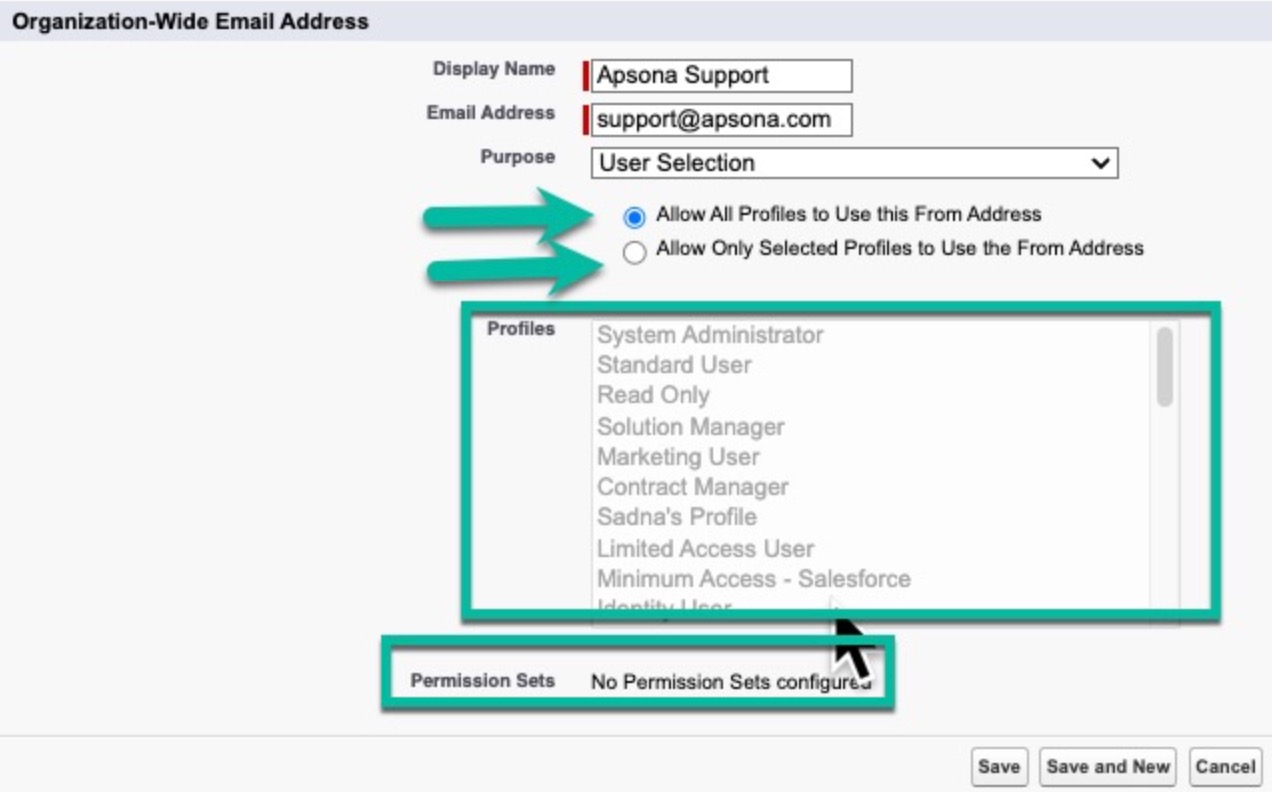
One possible reason that you receive an error regarding org-wide email addresses is that the org-wide email is not enabled for the profile or permission set of the user. To address this visit Setup and search for "Organization-Wide Addresses". Click 'edit' next to any organization-wide email address being used by Apsona. Ensure that you have included the user's profile or permission set. See screenshot below:
Pro tip: If you search in your browser for the error text, you should find helpful articles like this one
For more information about orgwide emails, see this article
If this is happening in a sandbox, try adding the "View Setup and Configuration" permission. According to this article this permission does not give the permission to modify things in Setup. See this knowledge article for more details on this permission.