Why is the downloadable link not appearing after clicking "Proceed" in Button Merge?
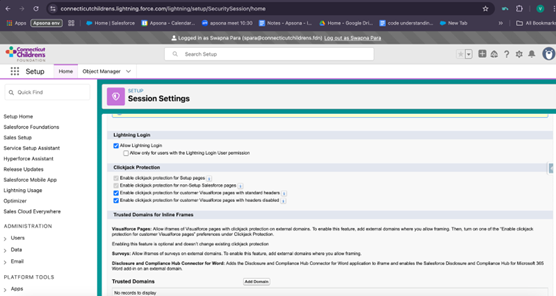
The issue occurs due to Salesforce Clickjack Protection settings being enabled in the org. Specifically, the following options are turned on:
-
Enable clickjack protection for customer Visualforce pages with standard headers
-
Enable clickjack protection for customer Visualforce pages with headers disabled
With these settings active, only trusted domains are allowed to embed Visualforce pages inside iframes. Since no trusted domains have been configured, the iframe is blocked, leading to a "Refused to connect" error. This prevents the Button Merge downloadable link from displaying.
 <!--DIMENSION:|400x400-->
To resolve this issue, add the Salesforce org domain (or the domain where the iframe is used) to the list of Trusted Domains:
Steps:
-
Go to Setup in Salesforce
-
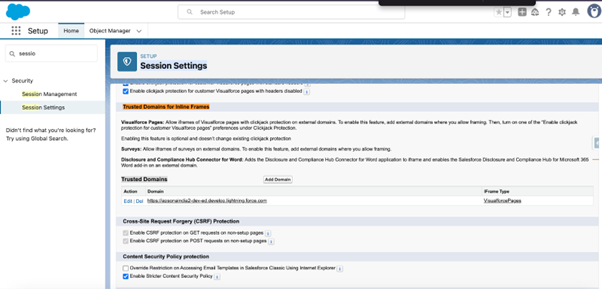
Search for and open “Session Settings”
-
Scroll down to the “Trusted Domains” section
 <!--DIMENSION:|400x400-->
-
Click “Add Domain”
-
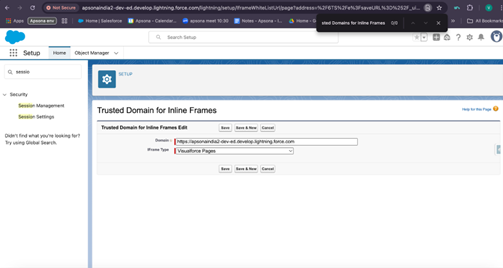
Enter the Salesforce org domain or the external domain used in the iframe
 <!--DIMENSION:|400x400-->
-
Under Iframe Type, select Visualforce
-
Click Save
Once the domain is added:
-
The Visualforce page will load properly inside the iframe
-
The Button Merge downloadable link will become visible
-
Clickjack protection remains active to ensure security is maintained
for more information: refused to connect issue - button merge