Why don't I see the Batch Gift Entry tool
If you just installed Apsona's Batch Gift Entry tool, contact sales@apsona.com and provide your Org ID. Staff has to generate an internal record in our system in order to give you access to the tool.
Each Salesforce profile using the tool needs create/read/edit access to the native Salesforce objects Contact, Account, Opportunity, Campaign and Opportunity Contact Role, the NPSP objects Payment, General Accounting Unit and GAU Allocation, and the custom Batch and Batch Item objects from the Apsona Batch Gift Entry package.
Users also need full read/write access to all the fields of all of the above objects.
Users also need "delete" access to the GAU Allocation object and the Batch Item object.
If you do not provide access to the General Accounting Unit and GAU Allocation objects, your users will not be able to create Allocation records via the batch tool.
Ensure that the Apsona Configuration for the users' profiles has the Batch and Batch Items object included, but NOTE: Do not add the Batch or Batch item objects to Apsona’s menu bar (in the last screen of the Configuration pop up) or the Batch tab may not appear correctly.
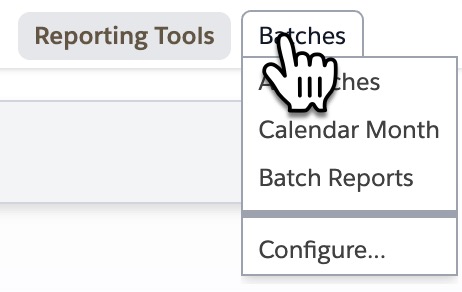
If the above setup steps are correctly carried out, the Batches tab will appear to the right of the Reporting Tools menu.
Sandboxes:
If you want to use Batch Gift Entry in a sandbox, contact sales@apsona.com and provide your Org ID. Staff has to generate an internal record in our system in order to give you access to the tool within the sandbox environment. This step must be taken for every Salesforce environment that you want to use Batch Gift Entry within.
See this article to set up the Batch Gift Entry tool.