Why do I get an error about "Apex Time Out / Apex CPU Time Limit Exceeded"
Typically Salesforce processes 200 records at a time, in batches, during import and update operations. Sometimes automation running on the Salesforce side (more common in NPSP environments) can cause these operations to run slowly and hit limits.
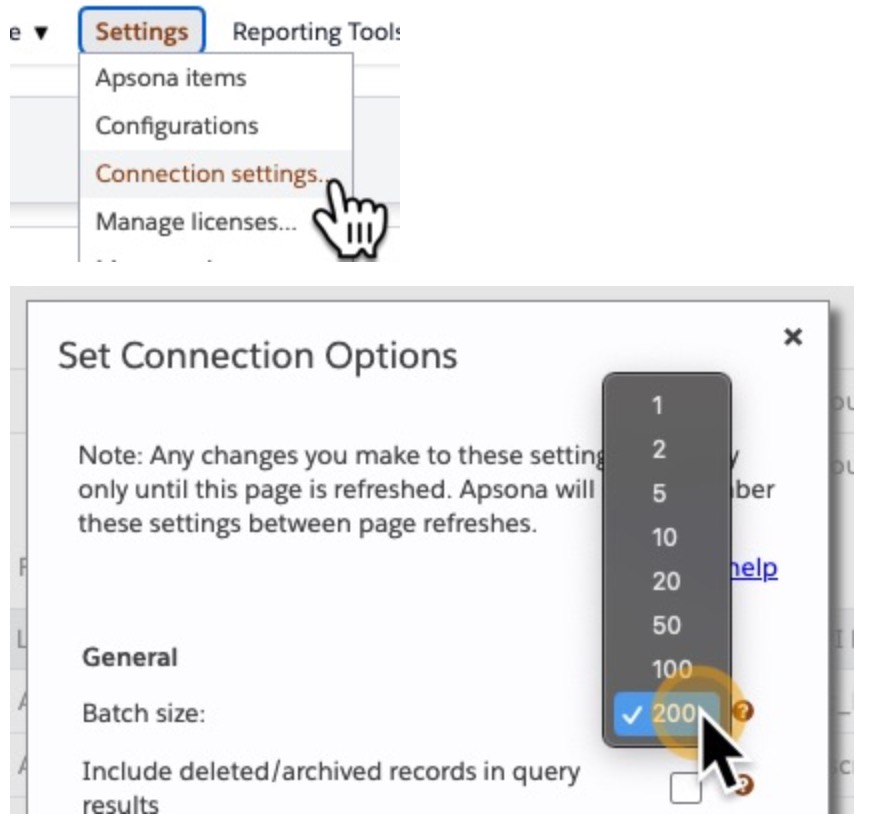
It may help to reduce your batch size. You can try reducing it to smaller amounts, even as small as 1 record per batch if needed. There is no harm in reducing your batch size. This does not mean you have to run your operation several times. It just means that Salesforce will process your job in smaller 'batches' and may take longer.
NOTE: This is a temporary update in Apsona. When you refresh your screen, or log out and back in, Apsona will reset to the default batch size of 200.
In Apsona, go to Settings->Connection Settings->Batch Size and try a smaller number: