Why can't I see a merge button. Merge button disappeared. I get error about not having a merge license
Are you getting this error: "Your user has not been assigned a license for the Document Merge add-on. Please contact your administrator to assign your license via Settings - Manage Licenses - Assigned Users"?
This error may occur because the user has not yet been assigned a Document and Email Merge license. Please ensure the "Doc Gen" checkbox is checked for the user in the Manage Licenses section. This article has more details on how to navigate to this location in Apsona. Please see the screenshot below.
NOTE: If this error occurs in a sandbox, please see the additional notes at the bottom of this email.
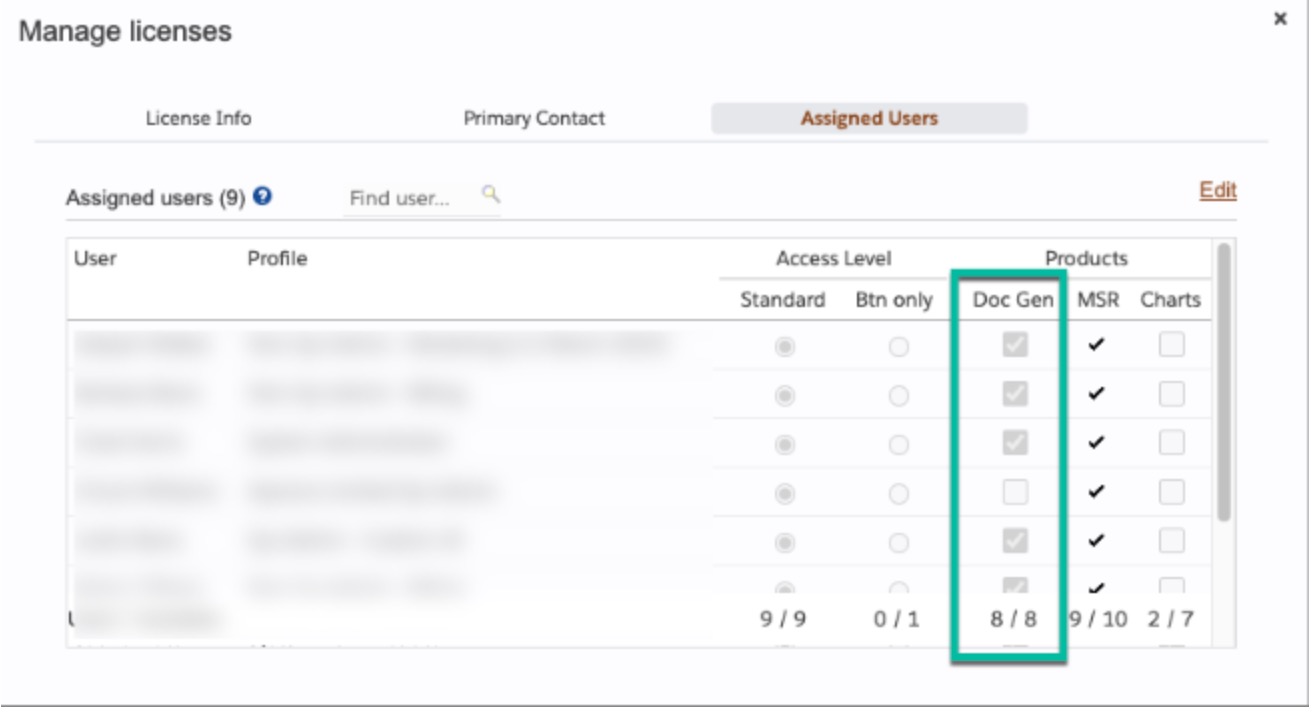
If the "Doc Gen" box is already checked, here are some other things to check:
- Ask the User to clear Apsona's cache. Apsona is a browser-based application and uses a browser cache to hold Apsona and Salesforce settings. This cache is unique to every user, computer, and browser. Whenever you make changes in Salesforce (ie: new fields, objects, or user permissions) Apsona won't see them until the cache is cleared.
- Make sure the user profile or permission set has access to the Salesforce Document object.
- Make sure the user profile or permission has read/edit access to the "Apsona Items" object.
- Make sure you have an Apsona Configuration for the user's profile and that it has Salesforce Documents included as an available object. This article has more information on Apsona Configurations.
- Does your merge action involve a Multistep report? If so, does the user have a Multistep Reporting license assigned? If not this could lead to issues. Users running merge actions that involve a Multistep report need a Multistep report license. See our License Assignment playlist for instructions.
- If you make any of the changes above, ask the user to clear Apsona's cache again.
- Let us know if these things do not solve the issue.
Are you working in a sandbox?
- Sandboxes do not allow for traditional licensing. As a result you may not see the Apsona user in the "Manage License" screen and thus you won't be able to check the "DocGen" box for them. If this is the case there are two options:
- You can check the "View Setup and Configuration" permission in their profile or permission set. This will allow Apsona to 'check in setup' to make sure that the environment is a sandbox and give them access to the document merge tool. This only applies to sandboxes and this does not give edit access to Setup, just view access.
- You can contact support@apsona.com and ask us to check the "DocGen" box on your behalf. Even if you don't see the Apsona user in the "Manage License" screen, we will see that user in our internal system and can update them to give them acess to the tool.
- In some cases, the sandbox Document and Email Merge license may be expired in our system, even though all Apsona tools should never expire in sandboxes. If none of the above solutions work, let us know and we can check the expiration date in our system.
- In some cases, a new sandbox Apsona user may have had access to the tool and then all of-a-sudden lost access. This may be due to the trial behavior of our licenses. In a sandbox, when a user first logs into Apsona, an Apsona User record is generated and provided 30 days trial access, despite any permissions granted. Once that trial period is up, the user will lose access unless the "DocGen" checkbox is checked or "View Setup and Configuration" is checked.