Why can't I see a field or object in Apsona? Why am I getting error "Unable to access [fieldname] Perhaps you don't have access to these fields" or "Can't find field..."
If a user can not see a field or object in Apsona or encounters an error that states "Can't find field..." it can be for a variety of reasons. Here are steps you can take to solve this:
- Ask affected Apsona users to clear Apsona’s cache on their own machines. Apsona is a browser-based application and uses a browser cache to hold Apsona and Salesforce settings. This cache is unique to every user, computer, and browser. Whenever you make changes in Salesforce (ie: new fields, objects, or user permissions) Apsona won't see them until the cache is cleared. You can also clear cache on behalf of that user. See this article or this video for more details.
- If you are an admin, log in as that user and see if you get the same error. If you don't, it's even more likely a cache issue on the affected user's browser and computer, and not a permission or access issue in Salesforce.
- If the user has cleared Apsona's cache and still doesn't see the field in Apsona, but they do see it in Salesforce; then check the affected user's Apsona Configuration to ensure the object/fields are visible for that user's Configuration. If you change anything in their Configuration, ask them to clear cache in Apsona.
- If the user can not see the field in Salesforce either, review the user’s Salesforce Profile or Permission Sets for object/field access.
- If the field is a Lookup field to a different object, make sure that the referenced object is also included in the user's Apsona Configuration. For example, if the user is viewing the Opportunity object and they don't see the field "Primary Campaign Source" it may be because that user doesn't have access to the Campaign object in Apsona. Ensure that the Campaign object is included in their Configuration and Salesforce profile/permission set.
- If the steps above have not helped, the field may be a new field that is part of one of the Salesforce Clouds like Health Cloud, Education Cloud, Finance Cloud, Nonprofit Cloud, etc. These new fields often require the latest Salesforce API version. If Apsona has not yet been updated to the latest API version, these new fields won't be visible yet. If you suspect this to be the reason, let us know which field it is and which Salesforce Cloud you use so that we can research further.
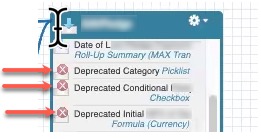
- Sometimes 3rd party managed packages retire fields in their package. When they deprecate a field it still shows up in Salesforce, but it becomes unavailable to Salesforce's API. Since Apsona uses Salesforces' API to query and display fields, the field will not show up in Apsona. To double check if this is the case, go to Setup and visit the Schema Builder. Find the field and look to see if it has a red "X" icon next to it. If it does then it's considered a deprecated field and will not show up in Apsona.
- If the user has the managed package Affinaquest: Affinaquest includes permission sets that give access to fields and objects. When Affinaquest is upgraded, there is a process that users have to take to gain access to the right fields and objects. This sometimes leads to a discrepancies between SF and Apsona. Check Apsona Configurations to ensure the newly added fields and objects are included.
If you need further support troubleshooting you can reply to this email or you are also welcome to sign up for an Apsona Hours time slot here.