Why can’t I easily find my template while configuring Document or Email Merge? How can I quickly locate a specific template?
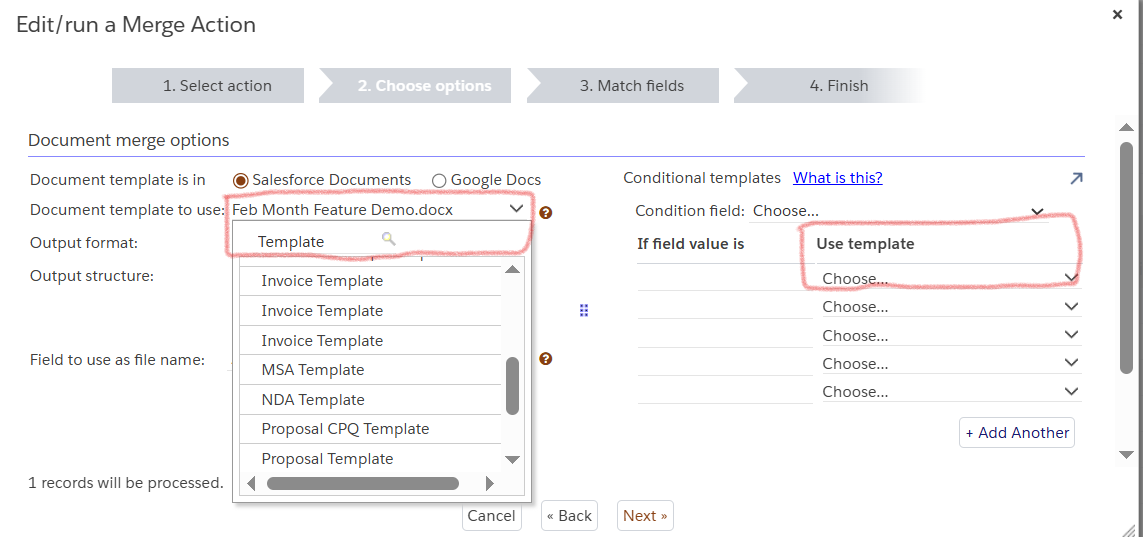
Apsona now provides a searchable and filterable template selection interface. Instead of scrolling through long dropdown lists, you can simply type the template name (or part of it) to quickly locate the desired template.
This enhancement is especially helpful if:
- You have a large number of templates
- Template names are similar or follow naming conventions
- You want to reduce the time spent during configuration
Where is this feature available?
- While selecting Document Templates during merge setup
- In the “Use Template” section for both Document and Email Merge configurations
This update is designed to make template selection faster, more accurate, and more user-friendly.
For more details or assistance, feel free to contact support@apsona.com