Why am I getting too many outputs (duplicate outputs) from my merge action?
If you are getting more outputs than you expect (ie: you are getting duplicate outputs for the same record), it is most likely due to the structure of the report that you are running the merge action from.
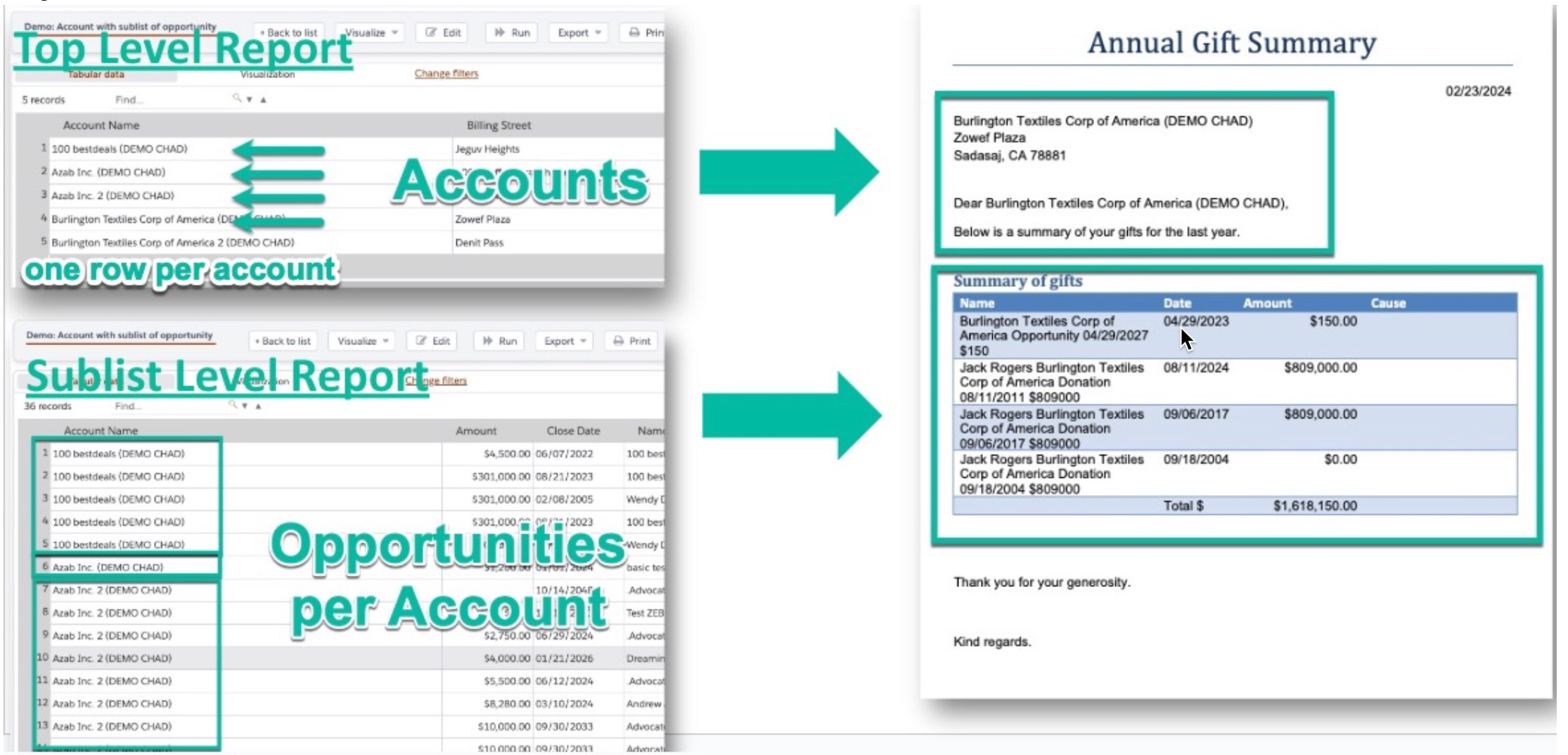
Apsona merge actions are designed to produce one output per row of the data source. Let's say you want to create a document per Account. If your Account report includes opportunity details, then you will get as many rows per Account as you have opportunity details. This will produce one document per row and thus you'll get duplicate outputs per Account. The solution is to remove the child object fields (ie: the opportunity fields) so that the report reduces to one row per Account.
If you need opportunity details for a sublist (ie: a list of related records in your output document) then you need to move those opportunity details to a second data source.
Merge actions with sublists require two data sources. One data source will be the "Top Level" data source, and should only include the parent records (like the Account). The other data source will be the "sublist" data source, will include the child records (like Opportunities), and will be mapped to the "record group" in step 3 of the merge action builder.
This article and this video describe merge action sublists in greater detail.
This visual helps to explain the data sources and how they feed the merge action: