Why am I getting the error "Cannot read properties of undefined"
It may be that a field or object is not available to the running user, either in Salesforce, or in Apsona. Make sure that the user's profile, or a permission set, provide access to all fields and objects involved in the operation you were attempting. Also make sure that the fields and objects are included in the user's Apsona Configuration. If the operation attempted includes a lookup field that points to an object that the user does not have access to, you must include the object as well as the lookup field to that object. See this article for more details on user access.
For more troubleshooting tips on field or object visibility please see these notes:
If a user can not see a field or object in Apsona or encounters an error that states "Can't find field..." it can be for a variety of reasons. Here are steps you can take to solve this:
- Ask affected Apsona users to clear Apsona’s cache. Apsona is a browser-based application and uses a browser cache to hold Apsona and Salesforce settings. This cache is unique to every user, computer, and browser. Whenever you make changes in Salesforce (ie: new fields, objects, or user permissions) Apsona won't see them until the cache is cleared. You can also clear cache on behalf of that user. See this article or this video for more details.
- If you are an admin, log in as that user and see if you get the same error. If you don't, it's even more likely a cache issue on the affected user's browser and computer, and not a permission or access issue in Salesforce.
- Check the affected user’s Apsona Configuration to ensure the object/fields are visible for that user's Configuration. If you change anything in their Configuration, Apsona's cache must be cleared for that user.
- If the user can not see the field in Salesforce directly, review user’s Salesforce Profile or Permission Sets for object/field access.
- If you can't see the field in Apsona either, and you've followed the steps above, identify if it is a newly added field from Salesforce. This often occurs if the field is specific to a cloud like Health Cloud, Education Cloud, Finance Cloud, Nonprofit Cloud, etc. It's possible that the field requires a certain API version to be accessed by Apsona. If you suspect this to be the reason, let Apsona know which field it is and which Salesforce Cloud you use so that we can research further.
- OPTIONAL: If the user has Affinaquest: Affinaquest includes permission sets that give access to fields and objects. When Affinaquest is upgraded, there is a process that users have to take to gain access to the right fields and objects. This sometimes leads to a discrepancies between Salesforce and Apsona. Check Apsona Configurations to ensure the newly added fields and objects are included.
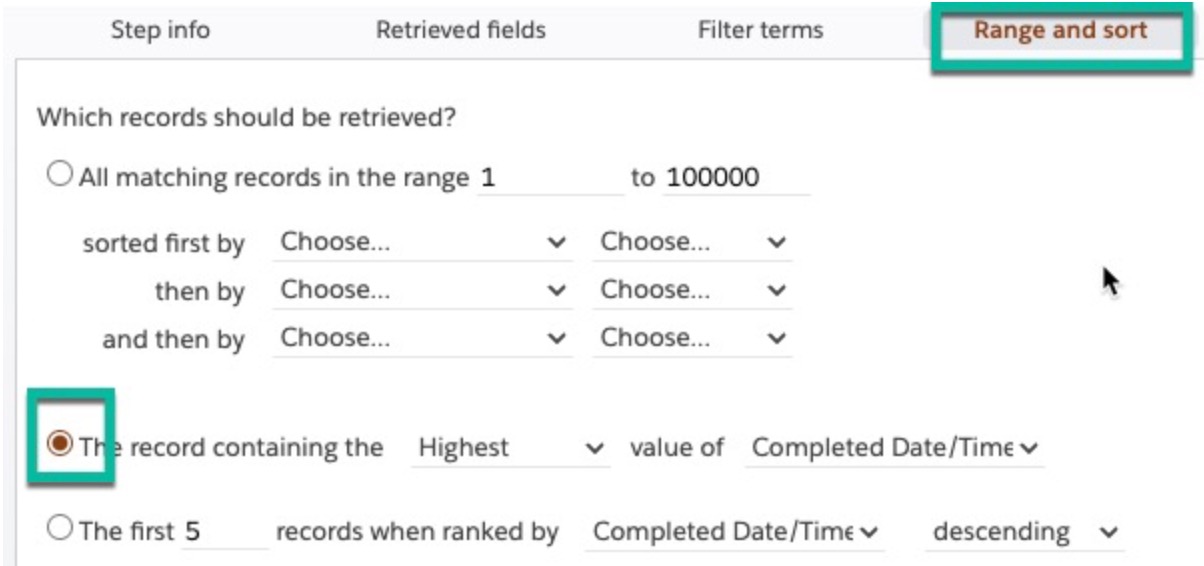
- The error of 'Cannot read properties of undefined' can also come up in a very specific scenario regarding our Multistep Reporting tool: If a step is linked to another step by a lookup field on a parent to the object that the step is based on (for example a step on Payment using the parent Opportunity's Account lookup field as a linkage to a prior step); and then the 'Range and Sort' tab is changed to provide a single record (see screenshot), then you may get this error. There are two workarounds to this. Either update the lookup field to one found on the object that the step is based on, or use the top option in the 'Range and Sort' tab, but reduce the range to be '1 to 1' records and sort by the field needed to provide the correct single record.